Showing posts with label outlook. Show all posts

Sunday, February 18, 2024

Why I did drop the new Outlook after using it 6 months

Microsoft is currently pushing users to "beta" test the new Outlook in the same way as the new Teams client.

The new Teams desktop client for Windows is a big step forward, means you can finally be active in different tenants. Previously you had to always switch tenant to receive notifications from other tenants.

Now the new Temas client allows you to receive notifications from all tenants which you are logged in. Hurrah, MS did finaly understand how modern working is, you are often not only in one company, but you have different teams and client connections. (Of course all major competitors like slack did have this feature from the start, many many years ago)

So now the new Outlook client suggests that you will also receive better user experience compared to the "old" one.

Before switching to the new desktop client you have to know of a few (breaking) changes

1. You old addins won't work any longer, you have to look if a web version of these addins exist and install (and perhaps purchase) these. If they don't exist, your out of luck. But on the plus side, if such a plugin exists, you will also have it available in the web frontend

2. You will finaly be abke to drop the old pst files, together with all the problems comming along with them. On the backside, the search (or better the find) capability in outlook across accounts is not existent. Also moving emails/calendar entries between accounts isn't fun with the new interface and you can't automate these any longer

 If you can live with these, then you can consider using the new client, but stop, there are two more things, which microsoft did not tell us initially:

1. All acount data of other smtp/imap/pop3 accounts, together with all the emails etc. are sent to the microsoft servers. And yes, it's not a bug, it's a feature, to allow "better user experience" across systems. And there is no way to opt out of this account stealing, togerther with all your emails from foreign accounts

2. You can't use the new outlook desktop client to access exchange mailboxes, which have only a exchange online 1 or 2 license. If you wish to use it, then you have to upgrade the exchange online 1 or 2 license to a Microsoft365 licence which includes the desktop apps. So instead of paying 3.60 CHF/Month per mailbox (Arround 4$) you have to pay microsoft 11.20 CHF/Month for the Business Standard plan.

The last point is especially stange, but microsoft has confirmed this behaviour as the expected way of working (Read get more revenues). When you had added exchange online mailboxes to the "old" Outlook, then the automatic migration to the new outlook takes them over with no hick up and they work wonderfully in the new Outlook. Be beware, if you remove them, there is no way to re add them back, MS does a license check and denies you this.

Currently I have two employments with fully licensed Microsoft E3 enterprise tenants, and also 3 more tenants where I have full Microsoft education licenses. And even with these 5 Office 365 licenses together, I'm not allowed to open a simple Exchange Online mailbox...

If you continue down this road, then microsoft might publish new Excel and Word versions, which won't allow you to open/edit documents, if they are not stored on some kind of licences microsoft storage, just plain silly.

 So I started using BlueMail as my mail client for the Exchange stuff and the good old Thuderbird for all non-microsoft mailboxes.



Monday, February 28, 2022

Outlook does not allow you to subscribe to all calendars of distribution lists

 In previous Outlook versions you could subsribe to all calendars of all members of a distribution group, by just selecting it in the address book.

With current Outlook versions this mostly don't work and you receive the message that you have to subscribe to the calendars one by one.

In german this is the error message you get: 

The same behaviours also occurs, when you try to subscribe to all rooms at the same time.

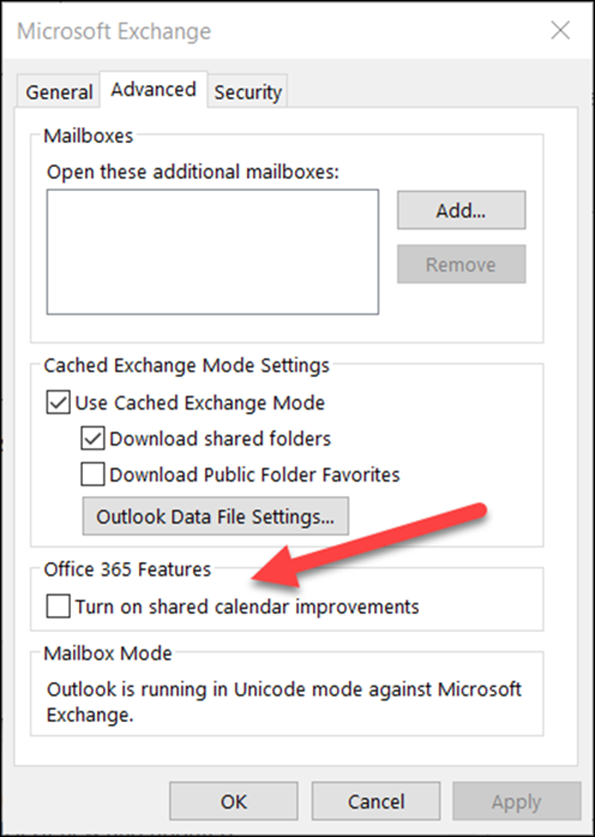
To get this working again, you have to disable the "Shared calendar improvements", at least for the duration when subscribing to the calendars.

When this checkbox is disabled, you can again subscribe multiple calendars in one step.

You can turn on the shared calendar improvements with a checkbox.

https://support.microsoft.com/en-us/office/outlook-calendar-sharing-updates-c3aec5d3-55ce-4cea-84b0-80aab6d8dc26

Please be aware, that you should reenable this setting after subscription, otherwise your subscribed calendard will get lost when you have no connection to the server, or working offline.


 And a small side note: The GPO policy mentioned in the linked article no longer exists, so don't look for it in current admx templates.

Also setting the mentioned policy registry key seems to have no effect with current outlook versions as of 2022.

There is a new setting for REST communication with calendar server, but this seems to not solve the subscribe problem.

Tuesday, November 19, 2013

Outlook 2010 does not send emails with exchange server

Outlook 2010 and 2013 have a realy nasty bug.

The effect when connected to a exchange server shows up in the inability to send out emails.
Incomming mails in cached mode just work fine, and outlook tells us in the status bar "Connected to server".

When you write a mail, it just gets stuck in the outbox and tells us about a communication error with error code 0x8004011D, meaning that the server is not available.
Just plain rubish, otherwise we would not have incomming mails and in the status bar it would not show "Connected to server"


When you create a new profile for the user, it works a few days, until again it blocks at this point.
When you create a profile without cached mode, it will work with no problems as well, but that's not the intention to have a cached mode.

The solution to this mistery are linked mailboxes.
When you create a profile and add the linked mailboxes as independent account's in outlook, you will get in troubles. It looks like outlook internally adds the linked mailboxes to the profile too, and then has double accounts and messes up things.

The solution is simple: Just remove the additional mailboxes from the outlook profile and mails will be sent out just as you would expect.

Thursday, March 15, 2012

Provide auto configuration for your mail services

When you use exchange with outlook then the client configuration works almost magically.
This is also possible for non-exchange mail servers.

The simplest solution is the new software called automx
Together with two entries in your dns you get automatic configuration.

The system covers automatic configuration for Outlook and Thunderbird (and all others using the same configuration discovery).
You specify what pop/imap/smtp services should be used and what ports and ssl/tls encryption should be used as default.

We at aarboard have now enabled this autodiscovery service for all our client domains.

Monday, June 6, 2011

SMTP SSL in Exchange 2007/2010

In exchange 2007 and higher, the default connector are configured to accept passwords only when using a secured connection (Like SSL or TLS).
A good idea
, but...


The SSL option is only available for POP and IMAP, on SMTP you miss this option, here you can only configure a TLS secured connection.

Not a problem.... do you think?
When you still have users accessing your mail server via POP3/SMTP with MS Outlook 2003 (Not uncommon these days) then they don't have the option to use SMTP with TLS, only SMTP with SSL is available...

Other products from the same company not offering SMTP with TLS are: Outlook Express, Windows Mail....

So you will either have to upgrade all clients to a new MS Office version, or downgrade security on your exchange server and allow the SMTP connector to also accept password over unsafe connections.

Or, probably the best thing to do: Just switch to a real mail user agent like thunderbird.....